Neuigkeiten im Club

An dieser Stelle informieren wir über Änderungen und Neuerungen im Photoclub. Zudem werden hier Aktionen bekannt gegeben. Künftige Gruppen-Moderatoren können hier ebenfalls ihre Beiträge veröffentlichen. Lasst uns gemeinsam etwas grosses erschaffen!

Wir sind natürlich ständig daran Photoclub zu verbessern. Unter Ideen für Verbesserungen haben wir dazu eine Funktion, in der neue Featurewünsche entgegen genommen werden. Dort kann dann über die eingereichten Ideen diskutiert und darüber abgestimmt werden.

Tipp: Brandaktuelle Neuigkeiten findest Du auch auf der Startseite unter dem Tab "News" und in der Tagesbox auf der linken Seite.

Moderators Wanted
Over the past few months, we’ve developed a system of "idea contests" and "groups" that will gradually allow us to hand over control of the Photoclub to you. Groups enable administrative rights to be automatically granted to all members within a group. For example, a "Moderators" group is given the right to moderate global content. Every member of this group can now moderate global content. This in itself isn’t anything special. However, the Moderators group can fully manage itself. It can appoint new moderators or remove those who aren’t up to the task. It can even appoint or elect a super moderator (group admin). The group has access to a variety of internal tools: groups have their own forum, a dedicated presentation page, unique categories, polls, idea contests, surveys, and a private group chat. To start, I will serve as the group admin for all moderator groups. Once we have a stable core of moderators, we can collectively vote on the group admin. If you’re interested in joining the team, please participate in our group ideas: CLICK HERE ...and show us in the forum what you can do as a moderator. Are you familiar with the forum rules? Do you know how to spark and encourage discussions? Can you stay calm and professional even when faced with personal attacks? Let’s also work together to identify who excels in these areas. Or maybe you already have candidates you’d like to recommend?
  • 15.08.2021, 15:34
  • 0
  • 8.197
Participation Welcome!
Within idea competitions, you can discuss, prioritize, and help implement your ideas for the Photoclub. This way, you have a say in how Photoclub evolves and which topics are addressed. Under the "participate" menu, you'll now find idea competitions for photo contests, weekly challenges, improvements, and groups. Additionally, there’s a new "Ideas" tab on the homepage. Please vote and share your thoughts in the comments of each idea competition!
  • 15.08.2021, 15:06
  • 0
  • 8.246
File Manager for Forum
Under the photos, people usually discuss the specific image. However, these conversations often lead to interesting discussions about creativity and technique. Unfortunately, such discussions tend to get lost quickly since the topic isn’t linked anywhere. That’s why we want to encourage pleasant exchanges about creativity and technique in the forum. A smooth and versatile way of handling files/photos is essential for enjoyable forum interactions. To make it easy to store, link, share for download, display, share, and even do basic editing of photos in the forum, we’ve introduced a file manager. Each member initially gets 200MB of storage space, which we can adjust later as needed. As a neat feature, the file manager can also be used within folder descriptions, enabling a versatile and creative approach to managing photos and videos. Combined with the "Edit" function, this opens up many new possibilities. With the file manager, we’ve laid the groundwork to more easily carry out our planned community projects. More details on that will be coming soon here in the news. You can access the file manager through the forum’s text editor. Just click the photo icon at the top of the editor. In the popup that appears, you’ll see a folder icon to the right of the usual URL bar—clicking this opens the file manager. To perform actions like editing, downloading, or linking a photo, at least one uploaded photo must be selected in the file manager. Photos uploaded in the "Uploaded Photos" category won’t appear in the file manager, but photos from other categories can still be linked in the forum using their PhotoID.
  • 25.04.2021, 14:40
  • 4
  • 5.146
Photos for Contests
We have improved the application process for photo contests. This brings us several advantages, including: Now, photos that have already been uploaded can participate in photo contests. Direct uploads to a contest are still possible as well. During the application phase, photos can be added to or removed from contests as often as you like, without having to delete and re-upload them. Photos can now enter multiple photo contests (simultaneously or consecutively). To add an existing photo to a photo contest, there is a new "Photo Contests" button at the bottom right of the photo’s detail view. Clicking it brings up a list of all photo contests currently accepting entries. (Multiple simultaneous contests are planned for the future.) Clicking on a contest opens a popup with the contest description and a corresponding button to add or remove the photo.
  • 11.04.2021, 16:39
  • 11
  • 7.856
Award Ceremony Optimized
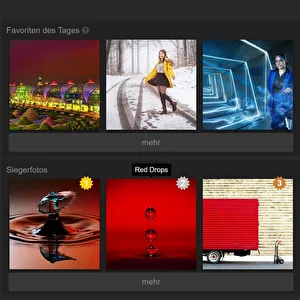
We've enhanced and expanded the awards ceremony for the photo contests. From now on, you can see not just the top 3 winners, but all photos that received at least one vote. Photos without any votes were either disqualified or overlooked by the judges because they didn’t sufficiently relate to the contest theme. That’s why these photos aren’t displayed. And, as always, we’ve optimized the layout for mobile devices as well. :) =>CLICK
  • 03.04.2021, 15:42
  • 15
  • 8.093
New Contact Management
We’ve refreshed and simplified the contact management feature. On your own profile, you’ll now find a "Manage Contacts" button directly below your contacts in the right-hand column. This takes you to the newly redesigned contact management page. Alternatively, you can access another "Manage Contacts" button via the "Contacts" icon in the top right navigation. Now, sending a contact request only takes one click. The popup for adding an extra message has been removed since you can now leave messages directly on each member’s profile. Contact lists are now displayed in the same format as member lists. Profile pictures in member and contact lists are also slightly larger, now 200x200px instead of 150x150px. While we were at it, we optimized the display of member lists on mobile devices as well.
  • 02.04.2021, 10:18
  • 0
  • 8.017
Follow discussions
In your profile, under the "more" tab, there is now a "Discussions" link that shows all the photos you’ve commented on so far. By default, the photos are sorted by the most recent comment date. However, you can also sort them as usual by the photo’s publication date, received likes, favorites, popularity, views, or number of comments. This makes it easier for you to keep track of your photo discussions. Many thanks to Matthias Polakowski for this great suggestion.UPDATE: You can now also organize and filter these photos by categories :)
  • 25.03.2021, 09:33
  • 0
  • 7.846
Exif optional
You can now choose to hide the display of Exif data. There is a new option called "Show Exif Data" available when uploading or editing photos. However, keep in mind that Exif data can be very helpful in evaluating a photo. It allows other members to better understand your photo and the conditions under which it was taken. This, in turn, enables them to give you more informed advice on how to improve your photography. For all photos uploaded so far, Exif data display is enabled by default but can be turned off using the "Edit" button. For new uploads, the option is selected automatically. So, if you don’t want to hide the Exif data, you don’t need to do anything and can continue uploading as usual.
  • 24.03.2021, 18:19
  • 0
  • 7.439
Profile simplified
To make the software even easier to use, we’ve made some fundamental structural changes. The profile now has 3 tabs, dividing it into 3 sections: "Profile," "Photos," and "More." The "Profile" tab is now the first tab and, as before, includes a comment feature along with the member’s profile information. The "Photos" tab contains all the photo sections that were previously found under "Timeline." The "More" tab holds all the links that used to be under "Photos." The comment feature has been removed from the Timeline since it’s now directly available on the profile. This new setup is much more logical and straightforward, making it more intuitive to navigate.With the change to the comment feature, we want to encourage more communication on profiles and, by extension, among members. I’d love for you to get things started by leaving a few comments on some profiles. For example, leave a compliment on the profile of an especially talented photographer or a particularly friendly member! Welcome new members with a comment on their profile! Or leave a PhotoID (which you can find in the bottom right corner of the photo’s full view) asking for feedback on a photo. To get this interaction going, it just takes a few people to take the first step. ;)Additional note: The Timeline link has been removed from the UserPopover (which appears when you hover over a member’s name). In the menu at the top right (under your profile picture), the "Timeline" link and all photo links have been replaced with a single "Photos" link.
  • 24.03.2021, 06:10
  • 0
  • 2.051
New Photo Order
We have revamped the photo folders (formerly profile folders). Photo folders allow you to organize your photos exactly the way you want. Within these folders, you can arrange your photos freely. You can also design your folder description as a webpage with your own videos, slideshows, and photos. This opens up entirely new possibilities for showcasing your photos. You can now even assign public categories to your photo folders, making your photos discoverable through category navigation. Photos in photo folders are no longer visible only on your profile. Therefore, photo folders are now exclusively available to Premium members. Additionally, there is a new "Folders" section in your profile timeline, where your created folders are displayed with a preview image each. HERE is a great example of how you can design your photo folders.
  • 23.03.2021, 16:59
  • 10
  • 2.026
Premium: 5 photos per day
Premium members can now upload 5 photos per day again. Due to frequent feedback about the "too low" daily upload limit and a decline in new premium memberships compared to new members overall, there was only one logical step. The upload limit had to be increased again if we want to continue growing while improving the ratio of comments to photos. Here’s the logic: More comments require more free members. The more premium members we have, the more advertising we can run to attract new free members. The more new free members we get, the better the ratio of potential commenters to uploaded photos becomes. Since premium revenue funds advertising for new members, we need to maintain an optimal balance between premium and free members. If we have too few premium members, we can’t run ads, which means fewer potential commenters join and growth stalls. With more premium members, we can advertise more to attract free members, resulting in more comments. It’s all interconnected. :-)
  • 23.03.2021, 09:06
  • 10
  • 1.870
New Competition Ideas
The new competition ideas are online. Please cast your vote! CLICKHank you so much for your suggestions :-)  
  • 19.03.2021, 14:18
  • 4
  • 2.074
New Member Search
Faster, more convenient, and more attractive. After updating the photo search, we've now also improved and enhanced the member search. You can now find the search directly on the member list. The links to the old search pages (photo search and member search) have been removed from the top menu.
  • 08.03.2021, 18:09
  • 0
  • 2.049
New Photo Search
Faster, more convenient, and more enjoyable. No gimmicks, no complicated settings, just enter a keyword and get inspired! The photo search is now available on every page without a single click. The results page has been redesigned to match the galleries. Plus, search speed has been significantly improved. Photos without titles and descriptions naturally won’t be found and therefore receive less attention and recognition. If you haven’t added titles and descriptions to your photos yet, now’s the time to do it. ;-) Please note that the photo search isn’t ideal for finding photos within a specific category. For that, the categories themselves are better suited. This is because many photographers don’t necessarily include what’s actually shown in the image in their titles or descriptions.
  • 04.03.2021, 09:45
  • 0
  • 1.977
Profile Photos
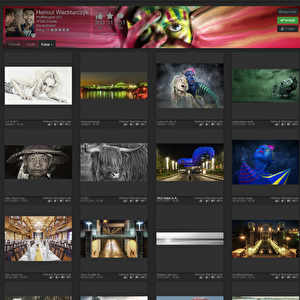
From now on, the preview thumbnails of your photos will be displayed directly on your profile (previously, they were shown in the gallery). So when you click the "more" button or "Photos" on your timeline, you’ll stay right on your profile page. Of course, your photos will still be visible in their respective categories. This means you also won’t leave a member’s profile when browsing their photos. Plus, your photos will be showcased more beautifully since your profile header will always remain visible above your photos. If you haven’t set a profile background image yet, now’s a great time to do so. :)
  • 03.03.2021, 14:27
  • 2
  • 1.922
Profile Visitors & Views
Your profile now includes a list of your recent visitors right below your friends list, along with the total number of profile views. This feature offers several benefits: 1. You can see how popular your profile is. The more active you are in the Photoclub, the more visitors your profile will attract. The higher your profile views, the more attention your photos will naturally receive. 2. You can find out who’s interested in you and your photos and visit their profiles as well. There, you can leave your avatar and profile link, which can lead to even more visits.Overall, this feature is designed to boost interaction and draw more attention to you and your photos. :-) If you prefer not to appear in other users’ visitor lists, you can browse in incognito mode. You’ll find this option in your Settings.
  • 02.03.2021, 15:10
  • 2
  • 2.049
New Profile, Camera Tag Search, and Mini Profile
New ProfileWe’ve revamped the profile to make it easier and more inviting to connect with others. On your profile overview, you’ll find a tab labeled "Profile". Under this tab, you’ll see sections like "About Me", "How I Got Into Photography", your "Cameras", "Accessories", "Software", and "Homepage". These details provide great conversation starters for reaching out. There’s also a comment feature alongside these sections where you can, for example, welcome new members, ask for feedback on your photos (just include your photo ID and a friendly note), thank people for their comments, express admiration, or simply say "hello." Improved Profile InformationThe more complete and detailed your profile is, the easier it will be for other members to connect with you. An empty profile rarely gets comments. So, take a moment to check how your profile looks now! Some profile fields have been updated to fit the new layout and should be reviewed and adjusted if needed. For example, your birthdate has been removed for better privacy and replaced with an "Age" field. On member cards, you’ll soon only be shown with your country, postal code, and city. Please update your information accordingly!New Camera Tag SearchThe camera brand is no longer a dropdown menu but a "tag field." Here, you should tag your camera brand and model separately. This makes it possible to click on a tag and see all members who use the same camera.Mini Profile in User PopoverGeneral info like location, age, and skill level now appear right next to the profile picture. These details are also displayed system-wide in the redesigned "User Popover"—the small popup that appears when you hover your mouse over a member’s name. This User Popover also includes links to your timeline, profile, photos, and ways to get in touch. It’s essentially a mini version of your profile accessible wherever your username appears.Since you can now introduce yourself through your profile and receive comments there, we will soon be closing the forum thread "Let Me Introduce Myself."
  • 24.02.2021, 17:35
  • 0
  • 1.633
News on the Homepage
Starting now, there’s a new "News" tab on the homepage. It displays the latest 10 updates from the Photoclub. We deliberately chose the English term here because the German word "Neues" felt too broad—it could also refer to new photos or forum posts. "News" suggests something more like a newspaper, which fits these updates better. Until now, these news items were found under the info/Blog menu, but since that section was rarely used, we’ve renamed it and placed it prominently on the homepage. This way, you’ll always have the latest news right in front of you.
  • 20.02.2021, 06:27
  • 0
  • 1.523
"Feedback Welcome" Icon
As requested, you can now see directly in the overview (below the preview image) whether a photo has been marked with the "Constructive Criticism Wanted" option. The icon is the same as in the category filter: a comment bubble with an exclamation mark: Photos without this option show the regular comment icon without the exclamation mark: So, if you like to give constructive feedback, you no longer have to click on the photo first to check if constructive criticism is desired. Of course, the category filter "Constructive Criticism" can still be used to display only photos with this option.
  • 19.02.2021, 05:41
  • 0
  • 1.582
Support system optimized
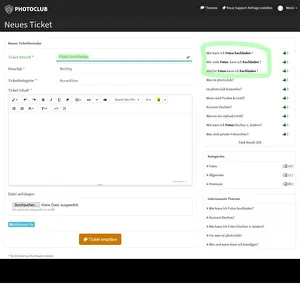
We’ve improved our support system (ticket system) to better address your questions and issues. It seems there were some misunderstandings about how to use the support system. Thank you all for your feedback on this. We’ve made several adjustments to make the process more intuitive for you. Previously, the help section was linked before the ticket system because most inquiries were questions already answered in the help section. This meant we kept receiving the same questions, which we had to answer repeatedly. Now, you can access help and support separately through the Help menu at the very top. When you enter a title for a new support request, it automatically checks the help section for matching tags (keywords) as you type. If there’s a match, a box will appear on the right with a relevant hint and a link to the help article. Additionally, on my profile (Toni) and anywhere my name appears, there’s now a “Message” button that lets you open a ticket directly with me.
  • 18.02.2021, 05:07
  • 0
  • 1.628
Advertising to Attract More Members
Over the next few weeks, we’ll be focusing heavily on promotion to attract more members to the Photo Club. This will include paid advertising, social marketing, content marketing, link building, and search engine optimization. As a result, the development of new features will be on hold for a little while. However, you can expect a noticeable increase in members very soon. So get ready to meet some interesting new people and see great new photos. If you’d like to help out, please check the "Get Involved" section in the menu. There are several ways you can contribute.   1. Like, comment on, and share our Facebook page,2. join our Facebook group and invite your photography friends,3. become a partner by adding your website to our link portal,4. invite photography friends using our "Invitation Form",5. and display our logo wherever you can.
  • 28.01.2021, 05:18
  • 0
  • 1.431
Photos of the Day
On the homepage, you’ll now see the top 3 picks of the day. These are photos that were published today and have received the most favorites (marked with a star) and/or have been added to a watchlist (marked with a bookmark). You can always find both options on the right side below a photo in the full view. If no photos have been marked with these features today, older marked photos will be shown instead. Favorites and watchlists are premium features designed to prevent manipulation through multiple accounts. UPDATE: The name has been changed from "Favorites of the Day" to "Photos of the Day."Premium just got even more worthwhile!
  • 27.01.2021, 15:00
  • 0
  • 743
New Photos on the Homepage
On the homepage, there is now a dedicated "Photos" tab that displays the latest photos from all members. In exchange, we have removed the "New Photos" section from the right sidebar. This means you can now see more recent photos with all the relevant details and larger preview images immediately, without having to visit the "New Photos" page itself. At the bottom of the tab, there is a "More New Photos" button that takes you directly to the second page of the "New Photos" section. Overall, this makes the experience much more consistent and intuitive. As a result, your new photos should receive more engagement, such as comments and likes, even if they have already moved out of view in the timeline.
  • 26.01.2021, 04:37
  • 0
  • 606
More Recognition for Premium Members
Since Premium members support the operation and ongoing development of the club with their membership fees, their photos deserve special attention. For this reason, we have created a new section on the homepage called "Premium Photos." Here, the latest photos from our Premium members are showcased. More visibility, more comments, more recognition for Premium members. Being Premium just got even better! You can find more Premium benefits HERE.
  • 25.01.2021, 03:02
  • 1
  • 618
Background Music
The right music can make a photo twice as powerful and twice as enjoyable to look at. Plus, background music helps you immerse yourself in an image and perhaps better understand the photographer’s intention. From now on, you can add background music or sounds to your photos. Simply include a YouTube link when uploading or editing a photo. Of course, you can also create and embed your own YouTube video. This way, you can enhance your photos with your own voice, sounds, or music. Once you’ve added background music to your photo, a small speaker icon will appear below your image. Click it to start the music, and click again to stop it. Have fun and get creative! You can see and hear an example of how this works HERE.
  • 24.01.2021, 04:13
  • 0
  • 521
Profile Statistics "Give and Take"
A community thrives on mutual exchange. To encourage this interaction, there is now a small statistic on your profile. It shows how active a member is in the areas of praises, favorites, and comments. The motto here is give and take. That’s why, in each of these three categories, both received and given interactions are displayed. This way, you can see for yourself whether you’re giving more or taking more. It’s like in real life—the more you give, the more you get. Someone who doesn’t comment or praise others rarely gets attention. Every time you comment or praise, your avatar and profile link appear under the photo. The more you comment and praise, the more visible you become, attracting attention, comments, and praise in return. So, if you want more reactions to your photos, try to give more comments and praises than you receive. Only then will these numbers steadily increase. If the balance is negative, these values will stagnate.You can also see how other members balance their giving and taking. This helps you decide whether to engage deeply with someone’s photo who doesn’t tend to comment themselves.All in all, this feature is designed to encourage more constructive feedback and well-deserved praise on your photos.
  • 20.01.2021, 03:07
  • 0
  • 575
7 Rules for Taking Bad Photos
Never, under any circumstances, read your camera’s manual! You simply must not get too familiar with your camera. That’s the only way to create truly creative and natural photos. Never let technology control you! YOU are the artist, not the camera. And no matter how the photo turns out—that was exactly the plan. If other photographers in your photo club don’t get it, that’s great. True artists can’t and shouldn’t be understood. Any knowledge about ISO, shutter speed, aperture, and depth of field is just technical interference that only harms the quality of your photos. So quickly forget all that. Better to set everything to automatic and just call the result “intentional” or, if in doubt, “creative art”! Keep as far away from your subject as possible. The main subject should never dominate the foreground. It would only get in the way. It’s important to include plenty of the surroundings in the shot. A truly great photo thrives on its little details. The more, the better. The actual subject should barely stand out. Don’t make it too easy for viewers to spot your subject. Puzzle-like images are simply more fun.   Sharpness is completely overrated! Always keep your camera moving! Never brace yourself or use a beanbag or tripod. A photo must come from motion, because motion is life. So do everything you can to avoid holding the camera steady. Here’s a little secret tip: do a quick sprint beforehand to get your pulse racing.   Avoid light whenever you can! Choose days and times with as little light as possible. Too much light might result in sharp photos. (See point 3) If you do end up with too much light, definitely increase the shutter speed to introduce some blur back into the photo. You should never be too picky about shutter speed anyway. It’s best to always err on the side of a little more.   Avoid any kind of composition. The rule of thirds, the golden ratio, and the golden spiral are total nonsense. Some mathematicians made those up just to annoy us. Use the center! It’s best to always place everything right in the middle. Photos shouldn’t have any tension—that belongs in the electrical outlet. And forget about image harmony. Harmony is just for New Age enthusiasts and crackpots.   Accurate colors are out of style. Mixed lighting is the way to go! Confuse your white balance. Always leave white balance on automatic and use a variety of light sources. The best combination is daylight, construction floodlights, fluorescent tubes, LEDs, and incandescent bulbs. That way, the auto white balance has plenty of options to choose from.   Avoid any image editing. Photo editing software is the work of the devil. It’s unnatural and distorts reality. A photo should be an exact representation of reality, not a piece of art that highlights a particular theme. Adjusting colors, removing distracting elements, straightening the horizon or vertical lines—all of that distorts reality. Instead, activate the timestamp on your photos so viewers know exactly when the photo was taken.
  • 13.07.2020, 10:19
  • 2
  • 767
Photo Contest "Three"
The theme of our photo contest in July is "Three." 3 things, 3 animals, 3 plants, 3 of anything, or simply the number 3. 
  • 12.07.2020, 14:29
  • 0
  • 545
Improvement in Text Fields
The built-in browser spell check now works in all text fields. Additionally, the forum editor includes a preview feature that lets you review your posts before submitting them. We hope this will help further improve the quality and usability of the forum.
  • 30.06.2020, 09:50
  • 1
  • 563
Rating Features
Lately, there have been quite a few discussions about the rating features. Some people even seem to really dislike these functions. Apparently, they find it impossible to simply ignore these features or to genuinely be happy for others receiving praise. For example, some former members have deleted their accounts solely because these features exist. Others attack members who appreciate and use the rating functions. So, it seems there are many misunderstandings and especially strong prejudices against the rating features. I wondered where these misunderstandings and prejudices actually come from and discussed this with a psychologist friend. There are mainly two reasons why some people find it difficult to see this feature as a positive addition: 1. Envy and Resentment Instead of Joy for Others The main reason is the feeling of being disadvantaged by this feature because other members, who supposedly have worse photos, receive more praise. They feel that this praise is undeserved. If they could simply be happy for those members’ praise (whether justified or not), they could share in others’ joy. But when caught up in envy and resentment, it’s impossible to “be happy for others.” By the way, a compliment doesn’t mean “this is a masterpiece.” It simply means the person giving praise appreciates a photographic achievement. The person praising isn’t saying the photo appeals to you or everyone else. They are acknowledging the photographic effort under very specific circumstances that you might not even be aware of. Praise is always subjective, never objective. Therefore, no one can judge another person’s praise. 2. The Idea That Praise Isn’t Helpful First of all, the praise function isn’t meant to be a tool for photographic development. It’s designed to let you express your personal appreciation for a photo and give the other person a good feeling. Praise doesn’t harm your photographic growth because it doesn’t claim a photo is a masterpiece. Praise encourages you to keep going, not to stop. The more photos you take and the more you engage with the craft, the better you get. Praise can never cause you to get worse. Of course, constructive criticism promotes growth... but praise does too! Praise instead of commenting? That’s nonsense! One doesn’t exclude the other. If someone doesn’t want or can’t comment on your photo, it’s hardly because of the praise function. It’s simply impossible to comment on every photo. You’d need more than 24 hours a day for that. So, when commenting, you inevitably have to choose. Whether your photos are included depends partly on the subjective quality of your photos and partly on your activity and behavior in the photo club. How you respond to constructive comments is especially important. The praise function has no influence on this!And now, let’s be clear! It can’t be that bad to make someone happy and praise them. What’s so wrong about making someone happy? Just like in real life, everyone appreciates praise, whether they admit it or not. So, I actually find this whole discussion pretty pointless. Just be kind to each other, leave envy and resentment behind, and praise photos you like. You can even add especially good photos to your favorites. It doesn’t even matter if they’re your own or not. And yes, of course you can praise your own photos too! There’s nothing wrong with that. PERIOD! To address the misunderstandings and prejudices mentioned above, we have revised the rating features. This mainly involves symbols, labels, help texts, and some minor technical improvements. Here’s a quick overview: "Like" for photos is now called "Praise Photo." For all other content, it remains "Like" as before. The symbol for this is now again the thumbs-up, as it best represents the function. The symbol for favorites is now a star (previously a heart), as this is simply more common. The number of praises is now again visible below the preview. Clicking it opens the list of raters. In all lists showing who rated, only members with profile pictures are displayed. Rating in the full view now works with a direct click on the symbol (previously "+" and "-"). Once you’ve rated, the symbol is shown filled (previously colored). In full view, raters (favorites and praises) are now displayed at the bottom right (previously in a popup when clicking the rating symbol) — again, only members with profile pictures. A member’s praised photos are now also visible to other members via their profile. Info texts, tooltips, and help have been updated system-wide accordingly. (Incidentally, the design of the full view page has been streamlined, making it lighter and clearer.) This blog post was written and can be linked to whenever the topic comes up again. Here again is the purpose of the rating features, which can also be found in the help section:1. Favorites a) Mark the best photos in the photo club as your top favorites. You can view your marked favorites under "Photos" in your profile. b) Photos are displayed in the photo club in various places according to their popularity. Additionally, the homepage shows a random selection of the most popular photos. The more members who favorite a photo, the higher it climbs in popularity. c) To prevent rating manipulation through multiple accounts, this feature is exclusive to premium members. 2. Watchlist Collect and organize photos according to your criteria, whether your own or others’. For example, create a private watchlist of photos to follow their discussions, or to comment on, recreate, or analyze them later. You can assign detailed permissions for watchlists, such as private, friends, members, or even individual people. This is a premium feature. 3. Praise Everyone appreciates praise. If you especially like a photo, you can express that with this feature. Your praised photos can be viewed by you and all other members under "Photos" in your profile. The number of praises, along with the number of favorites and comments, influences how photos are sorted by popularity. The more members praise a photo, the higher it rises in popularity. Of course, it’s always good to write a detailed comment on a photo. But sometimes you just want to express your praise or appreciation without writing a comment.
  • 30.06.2020, 09:36
  • 0
  • 488