Neuigkeiten im Club

An dieser Stelle informieren wir über Änderungen und Neuerungen im Photoclub. Zudem werden hier Aktionen bekannt gegeben. Künftige Gruppen-Moderatoren können hier ebenfalls ihre Beiträge veröffentlichen. Lasst uns gemeinsam etwas grosses erschaffen!

Wir sind natürlich ständig daran Photoclub zu verbessern. Unter Ideen für Verbesserungen haben wir dazu eine Funktion, in der neue Featurewünsche entgegen genommen werden. Dort kann dann über die eingereichten Ideen diskutiert und darüber abgestimmt werden.

Tipp: Brandaktuelle Neuigkeiten findest Du auch auf der Startseite unter dem Tab "News" und in der Tagesbox auf der linken Seite.

Improvements to Nested Comments
We’ve introduced two improvements to subcomments (comments on comments). These changes aim to 1. encourage more discussions and 2. prevent conversations from dying out. 1. Subcomments are now included in the total comment count on a photo. Points for subcomments are only awarded for detailed comments (100 characters or more). Photos uploaded before this change might still show the old comment count without subcomments included. The comment count will be recalculated and displayed correctly with the next new comment. If you want to update the comment count on a photo yourself, you can add a comment and then delete it—this will refresh the count. 2. You will now receive notifications for new subcomments on your own comments. Whether you get these notifications via email and/or system alerts can be set as usual under Settings / Notifications / Comments. Since we don’t change your notification settings without permission, notifications about new subcomments will only be sent for comments posted after this update—unless you’ve already added a subcomment to that comment yourself.
  • 13.06.2020, 05:18
  • 4
  • 499
Improved Homepage
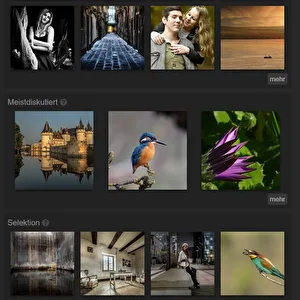
We’ve now added various “photo snippets” to the homepage for you to browse through. Each section is meant to be a starting point and inspire you to explore further. Let us know what you think! Is there anything we could improve here?New PhotosWell, not much to say here.Random PhotosHere you’ll see a random selection of all photos in the Photoclub. This gives older photos another chance to appear on the homepage. A special highlight: by clicking the “more” button, you’ll be taken to the new “Random Box.” There, you can view 12 random photos from all categories and keep reshuffling them as much as you like.Requesting FeedbackThis section shows photos marked with the “Constructive Criticism Wanted” option that haven’t received any comments yet. When you comment on one of these photos, it will disappear from this section and be replaced by another. You can activate or deactivate the “Constructive Criticism Wanted” option on any of your photos at any time, controlling whether your photo appears here.Popular PhotosHere you’ll find a random selection of photos that have received at least 10 likes or ratings in one(!) of the three categories. You can find the like and rating options in the full view, on the right side under each photo.Most DiscussedThis section features photos that have received at least 10 comments and are marked with the “Constructive Criticism Wanted” option. Perfect if you enjoy in-depth and lively photo discussions.SelectionHere you’ll see photos that the photographers themselves have pinned as favorites and that also have the highest overall ratings (sum of all likes/ratings). Think of this as a top list of photographers’ personal favorite images—a collective selection of user favorites. The like and rating options can be found in the full view, on the right side under each photo.
  • 09.05.2020, 12:43
  • 11
  • 538
Portfolio and Contacts
To draw more attention to your photos, we’ve expanded the portfolio on your profile page. Your portfolio now takes up half of the profile page, allowing for larger preview images and three new categories. Each category includes a button linking to more photos from that section. Categories will only appear once you have a certain number of photos, to avoid showing the same photos in multiple categories at the same time. Here are the categories now featured in your portfolio: New Photos This section appears as soon as you upload your first photo. It displays up to 8 of your newest photos. Just like before, but bigger, nicer, double the amount, and with a link to “more.” Random Photos This section appears once you have at least 25 photos. It shows a random selection of your photos, giving older images a chance to be seen again. Like before, but bigger, nicer, double the amount, with a “more” link, and only starting at 25 photos. Popular Photos This section appears once you have 50 photos. It displays your top 8 photos with the most ratings — essentially your personal leaderboard from the perspective of other members. Request Feedback This section appears once you have 75 photos. It shows 8 of your photos that you’ve marked with the “Constructive Criticism Wanted” option and that have received the fewest comments so far. My Selection This section appears once you have 100 photos. It displays 8 photos you’ve pinned yourself that also have the highest overall ratings. This is your personal top list, shown in order of ratings from other members. So you decide what’s featured here, but others determine the order. Additionally, the sections Contacts, Followers, and Connections (now called Mutual Contacts) have been simplified and combined into a single section.
  • 02.05.2020, 11:01
  • 3
  • 570
Category Rule
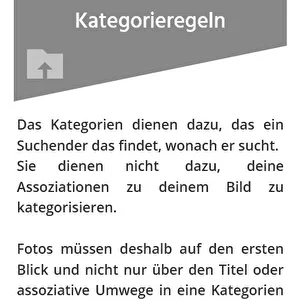
The first step to preventing chaos is setting up rules. To avoid further confusion in the categories, category rules had to be established. Please take a moment to read through the category rules at least once. They are fairly short and straightforward. You can always find them under info/Rules. It’s clear that many people misunderstand the purpose of categorizing photos: The categories exist so that someone searching can find exactly what they’re looking for.They are not meant to categorize your personal associations with your image.Photos must therefore fit clearly into a category at first glance for everyone, not just for you,either through the title or associative detours! A category system in a public gallery—where many very different people upload their photos—has different goals than your private category system in your personal portfolio. In a shared category system, it doesn’t matter what associations you have with your photo. The only thing that matters is which category the average community member would look under to find your photo. So set your ego aside and act in the interest of the community. You can express your personal associations with your photo through the title, description, and tags.   1. The category system is designed so that a searcher finds exactly what they’re looking for If the images shown match the theme of the category chosen by the searcher, their user experience is good. If the images are irrelevant to the searcher, their user experience is poor. Therefore, the categories assigned to images must make sense to the searchers, not the photographers. Photographers can always find their own images through their profile and relevant tags.   2. The category system is not meant to categorize your personal associations with the image Categories are not meant to describe associations that the image might or should evoke in the photographer or viewer. That’s the role of the image title and description! Categories are not meant to help you find your own images. You can do that through your profile or tags.   3. Tips for choosing categories First, ask yourself: What would most members agree on? What is the most distinctive feature of my photo? Is it the subject, the technique, or the message?   The Subject The subject is usually the easiest to agree on because it’s obvious and indisputable. So always try to categorize your image by its subject first. This makes it easiest to find.   The Technique The technique isn’t always obvious, but it is a fact. You should only choose a technical category if the technique clearly dominates the subject.   The Message The message of an image is purely subjective and will be perceived differently by everyone. Titles and descriptions don’t change that. Therefore, the message should only be used as a category in exceptional cases. ​
  • 01.05.2020, 14:37
  • 0
  • 589
New Photo Contest: "Animal Photos"
The submission phase for the April photo contest has ended. You can now vote for your favorites. At the same time, our May photo contest "Animal Photos" is kicking off. Wildlife photography presents a unique challenge because animals don’t always cooperate the way we’d like. That’s why the rule here is: the more zoom you have, the more opportunities you’ll have. But great results can also be achieved with shorter focal lengths—you just need to know how. Share your tips and experiences through your animal photos and join this exciting photo contest!
  • 01.05.2020, 11:47
  • 0
  • 446
New Membership Card
Plan meetups and photo tours or simply connect with members in your area. Starting now, you can find a world map of our members under photographers/Map. This map displays all members who have provided location information in their profiles. The more precise the details, the more accurate the marker. If you prefer not to appear on the map, you can disable the "Show on Map" option in your privacy settings. We hope this feature brings us closer together and strengthens our community even more. If you haven’t added your location to your profile yet, now’s a great time! Long-time members might remember we tried to implement this feature before, but ran into issues with the Google API—issues that Mik has now resolved. Enjoy our new feature!
  • 25.04.2020, 09:02
  • 9
  • 553
Topic of the Week
Starting now, there’s a new tab on the homepage called "Theme of the Week." Each week, this tab will challenge you with a new photography theme. We hope this new feature will make club life even more exciting. Additionally, we want to promote underused categories and help you get more familiar with the category system. Have fun! :-) Please note that the same rule applies here as in the photo contests and now also in the categories: Photos that don’t clearly relate to the theme will be deleted without comment. No matter how good the photos are, they must fit the theme precisely—not just through the title or associative connections. Also, please take a look at our current forum topic on this: Unfortunately, about 20% of photos were uploaded to the wrong categories.
  • 22.04.2020, 10:35
  • 1
  • 458
New Payment Options for Premium
We’ve greatly expanded the payment options available. So if you want to support your club with a Premium Membership, you can now choose from the following payment methods: Paypal, direct debit, bank transfer, giropay, Sofortüberweisung, Mastercard, credit cards, and debit cards. There’s something for everyone now. For just €38 a year, you’ll get new features and enhanced capabilities. Plus, you’ll gain more visibility for yourself and your photos. But the best part: you’ll be helping to attract new members, grow and improve the club, and develop exciting new features. Check it out for yourself: ALL PREMIUM BENEFITS
  • 18.04.2020, 15:54
  • 0
  • 477
Photoclub Messenger
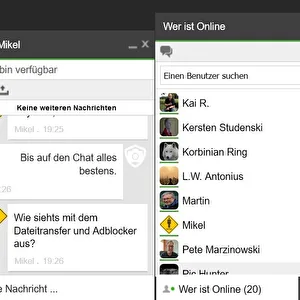
For Easter, we've placed a little Easter egg for you in the bottom right corner of the screen. It’s our new messenger. There, you can see who’s currently online and send them a message. The messenger isn’t meant for image discussions, suggestions for improvements, bug reports, or support requests. Please continue to use the usual channels for those, as they’re better suited. The messenger is simply designed to enable direct conversations and help bring us closer together. As long as you keep a browser tab with Photoclub open, you’ll appear online in the messenger. You can change your status yourself by clicking the small gear icon and entering or selecting something there. If you’re active in another browser tab and receive a new message, a notification sound will play and a small red icon will appear on the tab.
  • 12.04.2020, 14:47
  • 8
  • 405
New Photo Contest: "In These Times"
The first photo contest you chose focuses on a current topic. A subject that affects us all. Join in by capturing and describing your surroundings during these extraordinary times! How are we coping with these new and unprecedented challenges? New daily routines, altered schedules, restrictions on gatherings and contact, school and daycare closures, neighborhood support, assistance for artists and small businesses, applause for medical staff and other essential workers, and not to forget the daily news frenzy. Solidarity, social distancing, fear, hope, confusion. An endless world of (photo) themes—perhaps even a way to cope. Many thanks to L.W. Antonius for this contest idea.
  • 01.04.2020, 14:43
  • 0
  • 525
Ideas for Photo Contests
We’ve introduced a new feature: "Competition Ideas". Now, every member of the Photoclub can submit suggestions for photo contests online and vote on them. The idea with the most votes will be chosen for the next photo competition. Got a truly original idea for our upcoming contest? Then create a "Competition Idea" and invite your friends to vote for it. By the way, our next competition kicks off on April 1st.
  • 29.03.2020, 17:26
  • 4
  • 559
New Link Directory
To raise awareness of Photoclub and attract more members, we’ve developed a link directory over the past few weeks. Starting now, you can promote your website or photo community profile on Photoclub. All visitors and members of Photoclub have a strong interest in photography. This means you’ll not only get more visitors to your website or community profile, but you’ll also reach an audience that’s 100% passionate about photography. At the same time, you’ll be helping to increase Photoclub’s visibility, bringing in more members, and generating more comments and attention for your photos. It’s a win-win! You can find the link to the directory in the main menu under "info/Photo Sites". Of course, you’re also welcome to mention Photoclub anywhere and as often as you like, even without a link entry. Graphics and logos for embedding are available in the main menu under "get involved/Logos & Banners".
  • 21.03.2020, 16:07
  • 13
  • 547
Changing Your Avatar and Profile Picture
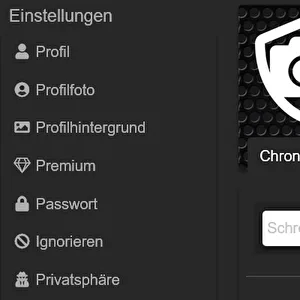
Since there have been recurring misunderstandings regarding avatar and profile picture, we’ve updated the terminology a bit. Instead of avatar and profile picture, we now have the profile picture and the profile background. You can upload either a photo of yourself or an avatar as your profile picture. Simple, darker patterns work best as profile backgrounds.  
  • 21.03.2020, 04:46
  • 0
  • 517
Exif Data
From now on, when you upload photos (if available), the key Exif data will be extracted. This information will then be displayed in the bottom right corner of the photo's full-size view. Unfortunately, this feature is not available for photos uploaded before this function was introduced, as the Exif data was removed during those uploads. If you notice any missing values or have suggestions for improvements, we’re always open to your feedback.
  • 12.03.2020, 01:13
  • 4
  • 490
Ranking, Points, Top Users
We’ve created a new page that lays out all the details about the ranking and points system in the Photoclub. You can find the link in the main menu at the top under Photographers/Top Users, or simply click on the rank badges (stars, smileys, etc.) next to any member’s name. This new overview includes the "Ranking" section, which shows what rank and badges you earn at different point levels. Under "Points Allocation", you’ll see how many points you earn for various activities within the Photoclub, and under "My Points", you can track exactly which points you’ve received and for what. Additionally, there’s a leaderboard highlighting the most active members (Top Users) in the Photoclub. Along with this, we’ve introduced a new filter for the member list. Just to clarify, Top Users doesn’t mean Top Photographers (that list is coming soon). For now, it’s all about members who contribute the most by actively participating in club life. We hope this update encourages more activity and brings even more energy to the club.    
  • 02.01.2020, 11:31
  • 5
  • 648
Wishing you a healthy New Year!
2020 wow, what a number. We wish you a healthy and happy New Year and want to thank you for being part of this community. A new year always means a fresh start—new ideas, new goals, and new paths. That’s exactly how it will be at the Photoclub. We have plenty planned. Stay tuned for some surprises! Warm New Year’s greetings from Lieke, Mik, and Toni
  • 02.01.2020, 09:40
  • 2
  • 584
New Photo Contests
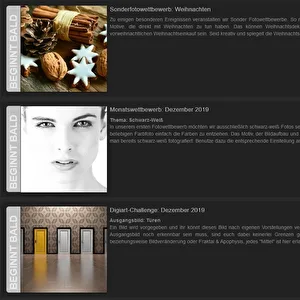
Our 3 new photo contests are now live. The themes are "Holocaust," "Angel Wings," and "Food Photography." With this selection, there should be something interesting for everyone. The special photo contest is perfect for a day trip. The Digiart Challenge features a very simple, pre-cutout subject, making it ideal for beginners in digital image processing to create imaginative works. Next month, the challenges will get a bit tougher. And the monthly Food Photography contest should be doable at home or in the studio, even on a rainy day. Check out the photo contests here: CLICK
  • 02.01.2020, 06:33
  • 0
  • 546
Optimize Support Channels
There is an urgent need to improve our support at the moment. To achieve this, we want to optimize our support channels. Currently, requests come in through the forum as support inquiries and error reports. These generally fall into three main categories: "How do I do something?", "Suggest an improvement," or "Report an error." Sometimes, the same issue appears across three different communication channels; other times, seven topics are bundled into one forum thread, and all of these topics are also submitted as tickets. Often, multiple follow-up questions are necessary. It’s much more efficient to handle this in one place rather than three. Processing a request can take a long time. For example, with error reports, Mik works on the system and communicates intermittently with the member. For improvement suggestions, multiple conference calls may take place during the response period. All of this needs to be coordinated. To make coordination easier for us and improve support, please report errors only using the "Report an Error" function, submit improvement suggestions only via the "Suggest an Improvement" function, and send support inquiries through the Support Ticket system. Of course, you’re still welcome to seek advice and discuss topics in the forum—that’s great and should continue. However, please don’t assume that someone from support is monitoring the forum. Even I can’t keep track of every forum post. I hope you understand. Also, please don’t be upset if responses take a little longer right now. As you can see, we’re working on it :-)
  • 17.12.2019, 18:21
  • 3
  • 583
Profile Picture Adjustments
We've made a few improvements to the profile picture area. The text and inactive tabs now have a slightly transparent background, which significantly enhances readability on light profile pictures. The avatar is now 50% larger, which required adjusting the profile picture dimensions as well. Along with this, we updated the default profile picture and optimized the display for different screen sizes. Your profile photo should now be at least 1920px wide and 220px tall. For larger dimensions and on smaller screens, a cropped section of the image will be shown, centered at the top. If the image is smaller than these dimensions, it will simply be stretched. Feel free to check if your profile picture still looks good after the update and replace it if needed. A quick tip: simple patterns often work better as profile pictures than photos with many subjects and lots of detail, as this helps the text and avatar stand out more clearly.  
  • 10.12.2019, 07:46
  • 5
  • 521
Suggestions for Improvement
We want to make Photoclub better for you and need your help. Here, your suggestions for improvements are collected, discussed, and their importance to you is determined through voting. You can vote with a positive (in favor), neutral (doesn’t matter), or negative (against) vote. We look forward to your constructive ideas! Go to the improvement suggestions
  • 06.12.2019, 12:10
  • 5
  • 646
Advent Calendar
 The Photoclub Advent Calendar is here, bringing you not only fun but also these 4 great benefits: 1. Discover a little surprise every day. Get into the Christmas spirit in style with Photoclub!2. Earn 10 times the day’s number in experience points each day. Experience points unlock additional features in Photoclub.3. Receive one digit of your premium voucher for a full year of Photoclub Premium every day.4. To the left of the big W on the Christmas calendar, you can turn on the Christmas radio. Give it a try! But beware: The doors can only be opened on their designated day! Don’t miss a single day! Go to the Advent Calendar
  • 01.12.2019, 13:28
  • 5
  • 599
Photo Contests
Starting now, the Photo Club will feature at least 3 new photo contests every month. The first 3 contests kick off on December 1st. Each contest runs for one month, followed by a one-month voting period. Every member is welcome to participate, whether you’re a free or Premium member. Free members can enter 1 photo per contest and have 1 vote during the voting phase. Premium members can submit up to 3 photos per contest and have 3 votes. Have fun and good luck! Check out the photo contests!
  • 01.12.2019, 13:27
  • 3
  • 542
Get Involved
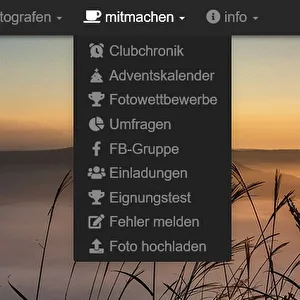
At the very top, there’s a new menu item called "Get Involved" with the following options: -Club Chronicle – Here you’ll find the club’s timeline, as well as the timelines of your friends and followed members, along with new photo comments.-Christmas Calendar – A little surprise every day, including a digit from your premium voucher, Christmas radio, and experience points.-Photo Contests – From now on, all photo contests in the Photoclub are listed here.-Surveys – Share your opinions on various topics and join the discussions.-Facebook Group – Join our growing Facebook group (600+ members) and connect with others there.-Invitations – Invite photography friends and acquaintances to get more feedback on your photos.-Suitability Test – A fun little multiple-choice quiz with photos to see if you’re a good fit for the Photoclub.-Report Errors – Help us improve the Photoclub by reporting bugs so we can fix them quickly.-Upload Photos – This menu item is included here again since it’s the logical place to find it.-More features coming soon.
  • 01.12.2019, 12:38
  • 6
  • 668
Upload 200 photos for free
As a free member, you can now upload up to 200 photos in the public categories and your profile folders. Showcase your 200 best photos to an audience interested in photography and see how others respond to your work. Once you’ve reached the 200-photo limit, you can continue uploading by simply deleting your least favorite photos. This way, you’ll always have space for new great shots and maintain a portfolio of your top 200 photos on the Photoclub, which you can reference and link to anytime. Upload your best photo now and see what happens! Upload Photos Now
  • 01.12.2019, 12:34
  • 7
  • 708
New: Blog
To keep you updated on news and changes, we’ve set up a small blog. We aim to keep the information in this blog as brief and to the point as possible, so we don’t bore you with long texts. You can now find the blog link anytime in the top menu under "info." New blog posts will also be shared in the club chronicle. We’d really appreciate it if you could share your constructive feedback on each topic in the comments.
  • 27.11.2019, 08:24
  • 0
  • 702
  • 1
  • Go to page:
  • 3
  • 4
  • 5