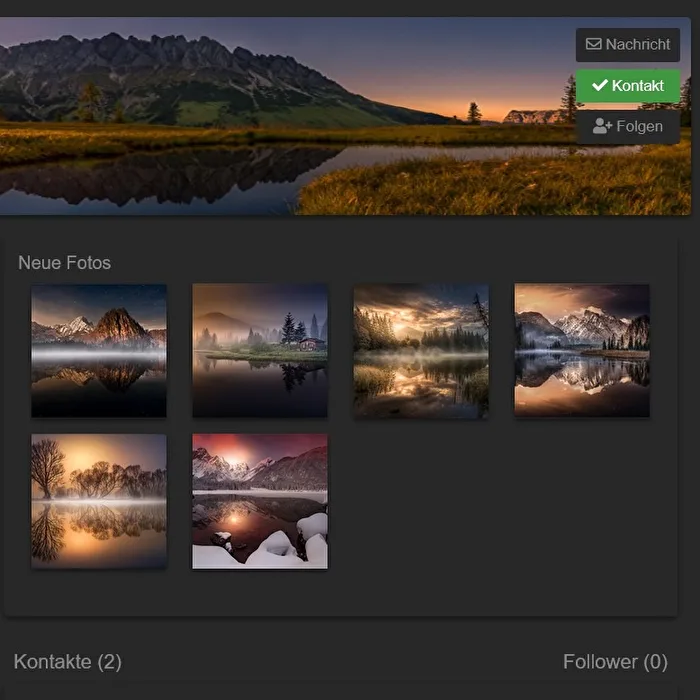
Portfolio and Contacts
To draw more attention to your photos, we’ve expanded the portfolio on your profile page. Your portfolio now takes up half of the profile page, allowing for larger preview images and three new categories. Each category includes a button linking to more photos from that section. Categories will only appear once you have a certain number of photos, to avoid showing the same photos in multiple categories at the same time. Here are the categories now featured in your portfolio:
New Photos
This section appears as soon as you upload your first photo. It displays up to 8 of your newest photos. Just like before, but bigger, nicer, double the amount, and with a link to “more.”
Random Photos
This section appears once you have at least 25 photos. It shows a random selection of your photos, giving older images a chance to be seen again. Like before, but bigger, nicer, double the amount, with a “more” link, and only starting at 25 photos.
Popular Photos
This section appears once you have 50 photos. It displays your top 8 photos with the most ratings — essentially your personal leaderboard from the perspective of other members.
Request Feedback
This section appears once you have 75 photos. It shows 8 of your photos that you’ve marked with the “Constructive Criticism Wanted” option and that have received the fewest comments so far.
My Selection
This section appears once you have 100 photos. It displays 8 photos you’ve pinned yourself that also have the highest overall ratings. This is your personal top list, shown in order of ratings from other members. So you decide what’s featured here, but others determine the order.
Additionally, the sections Contacts, Followers, and Connections (now called Mutual Contacts) have been simplified and combined into a single section.